What Is Workflow Automation? The Definitive Guide to Modern Efficiency
In a fast-paced digital economy, time is the ultimate currency. Yet, in many organizations, highly skilled professionals spend a staggering portion of their day trapped in a loop of repetitive, manual tasks: copying data from emails into spreadsheets, manually sending follow-up messages, chasing approvals, and moving files between disconnected software platforms.
This friction doesn’t just drain productivity—it kills momentum, introduces human error, and keeps businesses from scaling.
Enter workflow automation. It marks the shift from the problem to the solution.
Workflow automation is no longer a luxury reserved for enterprise giants with massive IT budgets. Today, it is a foundational business strategy that allows organizations of all sizes to orchestrate tasks, connect fragmented software systems, and empower human capital to focus on high-value, strategic initiatives.
This comprehensive guide breaks down everything you need to know about workflow automation, how it works, its core benefits, and how to successfully implement it within your business ecosystem.
Understanding Workflows vs. Processes
Before diving into automation, it is essential to clarify what a workflow actually is and how it differs from a broader business process.
A Business Process is a holistic, high-level collection of interrelated activities designed to achieve a specific organizational goal. For example, “Talent Acquisition” or “Customer Onboarding” are business processes.
A Workflow is the precise, sequential series of structured tasks and activities that execute a portion of that process. It defines exactly how data and documents move from one milestone to the next based on a set of predefined rules.
When you automate a workflow, you use technology to execute sequential tasks and route information between systems or people, removing manual intervention wherever possible.
How Workflow Automation Works: The Anatomy of a Sequence
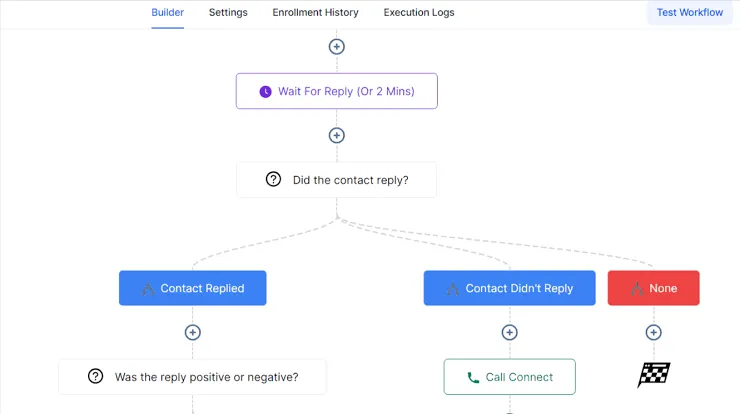
At its core, workflow automation operates on a simple, logical foundation: If This, Then That (IFTTT). Modern automation engines use a combination of triggers, conditions, actions, and integrations to orchestrate complex sequences.
1. The Trigger
Every automated workflow requires a catalyst—an event that tells the automation system to run. Triggers can be system-driven or user-initiated. Common examples include:
A new lead submits a form on a website.
An invoice status changes to “Overdue” in an ERP system.
A specific tag is being added to a contact within a CRM.
A file is being uploaded to a shared cloud folder.
2. Logic Gates and Conditions
Advanced workflows rarely move in a single straight line. They rely on conditional logic (if/else statements) to branch out based on specific criteria.
Example:If a lead’s company has more than 500 employees, route them to the Enterprise Sales Pipeline. Otherwise, route them to the SMB Sales Pipeline.
3. The Action
The action is the actual task executed by the automation system once the trigger and conditions are met. A single trigger can kick off a multi-step chain of actions, such as:
Creating a new record in a database.
Sending an internal notification via Slack or Microsoft Teams.
Generating a PDF document and emailing it to a client.
Updating a status field inside a project management board.
4. Integrations and APIs
For workflows to span an entire organization, different software applications must communicate with each other. This connectivity is achieved through Application Programming Interfaces (APIs) or middleware platforms (like Zapier, Make, or native integration engines within advanced CRMs and ERPs). These integrations bridge the gap between tools, ensuring data flows seamlessly from a marketing platform to a sales pipeline, and ultimately into financial software.
Key Pillars of Workflow Automation
Workflow automation generally falls into three main technological categories, depending on the complexity and structure of the data involved:
1. Business Process Automation (BPA)
BPA focuses on optimizing complex, end-to-end core business processes. It typically involves integrating deeply embedded legacy systems, managing large volumes of corporate data, and aligning multiple departments (e.g., enterprise resource planning or supply chain logistics).
2. Robotic Process Automation (RPA)
RPA utilizes software “bots” to mimic human interactions with digital user interfaces. It is particularly valuable for handling legacy systems that lack modern APIs. If an employee has to log into an old desktop application, manually copy a text string, and paste it into a web terminal, an RPA bot can be trained to replicate those exact mouse clicks and keystrokes.
3. Digital Workflows (API-Driven Automation)
This is the most common form of automation in modern SaaS ecosystems. It leverages cloud-native APIs to instantly pass data between modern applications. Tools like GoHighLevel, HubSpot, Odoo, and Salesforce rely heavily on these native, visual workflow builders to let users map out automations without writing lines of code.
The Strategic Benefits of Automating Your Workflows
Implementing workflow automation yields measurable returns across every layer of an organization. Here is why modern businesses are prioritizing automation:
1. Drastic Reduction in Human Error
Manual data entry is inherently flawed. Typos, missed notifications, forgotten follow-ups, and dropped handoffs between departments are inevitable when relying solely on human memory and manual speed. Automation executes tasks identically every single time, ensuring absolute precision in data management, documentation, and compliance.
2. Unprecedented Scalability
If a manual process takes an employee 15 minutes to complete, handling 10 tasks a day takes 2.5 hours. Handling 100 tasks a day becomes impossible without hiring more staff. An automated workflow can process 10, 1,000, or 10,000 instances simultaneously in seconds, allowing business operations to scale exponentially without a linear increase in overhead costs.
3. Enhanced Employee Morale and Retention
Nobody goes to school or enters a professional field hoping to spend half their day copy-pasting numbers from a PDF into an Excel sheet. By offloading mundane, administrative “grunt work” to automation, employees can focus on creative problem-solving, strategic planning, and building genuine human connections with clients. This shifts their role from reactive maintenance to proactive value creation.
4. Accelerated Turnaround Times and Improved CX
In modern business, speed wins. If a prospect requests a quote, waiting 24 hours for a manual response gives competitors a massive window to step in. An automated system can capture the lead, calculate a preliminary estimate based on logic rules, and deliver a personalized response within minutes. Faster internal workflows directly translate to a crisper, more responsive Customer Experience (CX).
5. Data Integrity and Transparent Auditing
When processes happen inside automated pipelines, every action leaves a digital footprint. You know exactly when a form was submitted, when the database was updated, and when an invoice went out. This structured data makes tracking Key Performance Indicators (KPIs) straightforward and simplifies regulatory compliance or internal audits.
Real-World Applications Across Key Departments
To fully grasp the transformative power of workflow automation, let’s look at how it manifests across core business functions.
Sales and Marketing
Sales and marketing departments are often the fastest to adopt automation because the revenue impact is immediate.
Lead Nurturing & Scoring: When a lead downloads a whitepaper, a workflow automatically assigns a point value to their profile. If their score crosses a threshold, the system triggers an automated SMS or email sequence and schedules a task for an account executive to call them.
Pipeline Management: When a deal is dragged to “Contract Sent” in a CRM, the system automatically pulls data from the contact record, generates a contract via an e-signature tool, and texts the link to the client.
Finance and Accounting
Manual accounting practices are slow and prone to catastrophic errors. Automation brings an ironclad structure to financial operations.
Invoice Processing & Chasing: Once a project milestone is marked as complete, the system automatically generates an invoice and sends it to the client. If payment isn’t detected by the due date, a series of automated, polite reminders is triggered at specific intervals (e.g., 3, 7, and 14 days overdue).
Expense Approvals: An employee submits a digital receipt. If the expense is under $100, the system automatically approves it and queues it for reimbursement. If it is over $100, it automatically routes a notification to their direct manager for a one-click approval.
Human Resources (HR)
HR teams handle mountains of documentation and repetitive communication, making them prime candidates for automated workflows.
Employee Onboarding: The moment a candidate signs an offer letter, a workflow kicks off: an internal ticket is created for IT to provision a laptop and email account; a digital welcome packet containing tax and compliance forms is emailed to the employee; and introductory training modules are queued up in the learning management system (LMS).
Operations and Project Management
Task Assignment: When a client signs a contract for a specific service package, a workflow creates a new project board from a standardized template, populates the deadline dates based on the signing date, and assigns specific operational tasks to designated team leads.
A Step-by-Step Framework for Implementing Workflow Automation
While the benefits are clear, diving into automation without a structured plan can lead to fragmented systems and broken processes. Use this step-by-step roadmap to move from planning to a successful rollout.
PhaseObjectiveKey Actions
1. Identify & Map
Locate bottlenecks and map the current manual steps.Document the existing process from start to finish. Identify repetitive, high-volume tasks.
2. Clean the Process
Optimize the workflow before applying technology.
Eliminate redundant steps. Never automate a broken, inefficient process.
3. Select the Stack
Choose the right software tools and integration points.Determine if native CRM/ERP tools suffice or if middleware (e.g., Zapier, Make) is required.
4. Build & Test
Construct the automated logic gates and run trials. Build out triggers, conditions, and actions. Run thorough tests with dummy data to catch bugs.
5. Monitor & Refine
Deploy live and continuously optimize based on performance.Monitor execution logs, gather team feedback, and refine logic to maximize efficiency.
Step 1: Identify and Map Your Current Processes
Look for tasks that are repetitive, time-sensitive, involve structured data, and require little to no emotional intelligence or complex decision-making. Document every single step of this process exactly as it happens today. Note who touches the data, what apps are used, and where the bottlenecks occur.
Step 2: Clean and Optimize the Process First
“The first rule of any technology used in a business is that automation applied to an efficient operation will magnify the efficiency. The second is that automation applied to an inefficient operation will magnify the inefficiency.” — Bill Gates.
Never automate a broken process. If your current manual method involves sending data to three different people who don’t actually need it, fix the layout before building the software automation. Streamline the sequence first, then automate the refined version.
Step 3: Choose the Right Automation Tools
Select software that aligns with your technical capabilities and business scale.
If you are managing client relationships, marketing, and messaging funnels, an all-in-one automation ecosystem like GoHighLevel offers highly specialized visual workflow triggers, SMS/email automation, and pipeline mechanics.
If you are looking to tie together disparate, specialized cloud tools, integration platforms like Zapier or Make act as excellent universal translators.
For deep, company-wide operational resources, an integrated ERP platform like Odoo provides native automated workflows spanning inventory, manufacturing, and accounting.
Step 4: Build, Test, and Deploy
Start small. Build out your triggers and actions, and run rigorous tests using test data (e.g., your own email address and phone number). Check for edge cases: What happens if a user leaves a required field blank? What happens if an API call times out? Once the system proves stable, deploy it live.
Step 5: Monitor, Analyze, and Iterate
Automating a workflow isn’t a “set it and forget it” project. Monitor your automation logs regularly to catch errors. Ask your team whether the new automated handoffs are genuinely saving them time or causing confusion. Continuous refinement is key to maintaining peak operational efficiency.
Best Practices and Pitfalls to Avoid
As you begin your workflow automation journey, keep these core principles in mind to avoid common deployment traps:
Don’t Lose the Human Touch: Automation should enhance user experiences, not dehumanize them. For instance, while automating customer service triage is smart, completely blocking access to a live human representative frustrates clients. Use automation to handle the logistics, so your team can deliver better personal service.
Maintain Explicit Naming Conventions: As you build dozens of automated workflows across your organization, a sequence named “Workflow 1” or “Test Automation” will quickly become a nightmare to manage. Use clear, structured naming conventions, such as: [Department] - [Trigger Event] -> [Primary Action] (e.g., [Sales] - Form Submitted -> Assign Lead & Tag).
Build with Error Handling in Mind: APIs change, servers experience downtime, and webhooks occasionally drop. Ensure your vital, business-critical workflows have fallback mechanisms or send instantaneous internal alerts if a step fails to execute properly.
The Future belongs to Automated Businesses
Workflow automation is fundamentally reshaping how modern companies operate. It is shifting the corporate paradigm away from administrative burden and toward creative, high-impact growth.
By identifying your organization’s recurring bottlenecks, streamlining operational logic, and deploying targeted automation frameworks, you can insulate your business against human error, reduce overhead costs, and build a highly scalable operational foundation.
The question is no longer whether you should automate your business workflows—it is which workflow you will automate first.


